Inside Entra Agent ID
Think of Entra Agent ID like a passport for an AI worker. The agent can move between systems, call tools, and act on behalf of users, but it should never travel without a clear identity, a defined route, and a responsible sponsor.
The blueprint is like a travel plan because it defines what the agent is allowed to do. Impersonation is the visa that allows it to act on someone else’s behalf. The human sponsor is the accountable owner who stands behind the agent when things go right, and when they do not. This is what makes Agent ID different from older non-human identities. It is not just a credential. It is an identity model built for action, ownership, and controlled blast radius.
This blog post focused on the anatomy of Entra Agent ID.
The Anatomy of Agent ID
To understand the anatomy of Entra Agent ID, we must examine both the functional components that make up an AI agent and the specialized identity architecture that Microsoft has built to secure, govern, and authenticate these non-human entities at an enterprise scale.
The Functional Anatomy of an AI Agent
Before an agent interacts with a directory, it operates according to a specific functional design that enables it to perceive and act autonomously. This consists of four core elements:
- Model: The core reasoning engine and central decision-maker, typically powered by a general-purpose, multimodal, or fine-tuned language model.
- Orchestration Layer: The cyclical process governing how the agent ingests data, performs internal reasoning, and determines its next action until a goal is met.
- Memory: Dynamic storage that provides up-to-date context, preventing the need for constant model retraining.
- Tools: Interfaces such as APIs, file systems, or web searches that extend the agent’s capabilities and allow it to manipulate its environment.
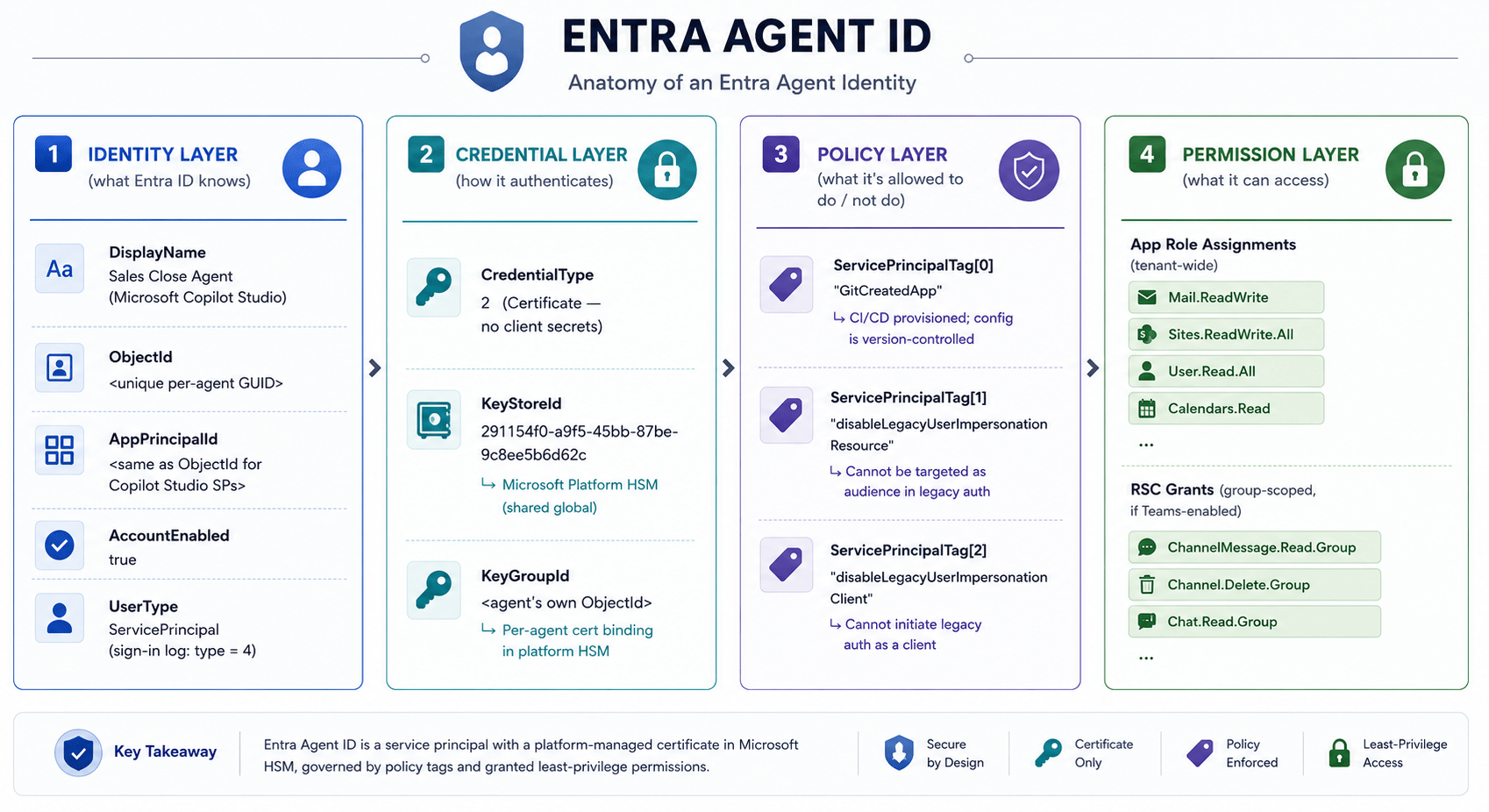
The Identity Architecture
Because AI agents are highly dynamic and often operate autonomously, traditional static service principals are insufficient. Microsoft Entra Agent ID uses a specialized, hierarchical identity construct to secure these systems.
Agent Identity Blueprint: This is the master template for all agent instances of a common kind (e.g., a “Sales Assistant Agent”). Unlike traditional applications, the blueprint acts as the centralized credential container. It holds the federated identity credentials (FIC), certificates, or client secrets used to authenticate all of its child identities. Furthermore, it serves as a management container for defining Conditional Access policies and inheritable permissions, allowing administrators to secure an entire fleet of agents from a single point.
Agent Identity Blueprint Principal: This is the tenant-specific instantiation of a blueprint. It is assigned the AgentIdentity.CreateAsManager role, granting it the authority to provision and manage the lifecycle of local child agent identities. When a blueprint acquires tokens within a tenant, the token’s object ID references this principal to ensure accountability in audit logs.
Agent Identity: A specialized service principal subtype that an individual AI agent uses to authenticate. Agent identities do not hold their own passwords or credentials. Instead, they rely on a token-exchange model in which the parent blueprint authenticates with its credentials to obtain an exchange token for the specific child agent identity. The agent identity itself holds the actual API permissions and Azure RBAC roles, and it serves as the acting client in sign-in and audit logs. Every agent identity requires a unique Object ID, a display name, and an assigned human sponsor.

Agent’s User Account (Agent User): This is an optional, secondary Entra user account paired exactly one-to-one with an agent identity. It is deployed exclusively when an agent must interact with human-centric collaborative systems that strictly require a user object (such as Exchange mailboxes or Microsoft Teams). Agent users receive tokens with the ‘idtyp=user‘ claim. They do not use passwords; they authenticate using federated identity credentials provided through their parent agent identity.
Because agent identities do not manage their own credentials, you must strictly secure their parent Agent Identity Blueprint to prevent a single compromised credential from impacting all associated child agents.
Operation and Authentication Patterns
Depending on their functional goals, agents interact with the identity platform through distinct operation patterns:
- Interactive (Assistive) Agents: These agents operate in an “On-Behalf-Of” (OBO) flow, responding to a signed-in human user’s prompts (e.g., a chatbot). They use delegated permissions, ensuring the agent cannot exceed the access level of the human user it assists.
- Autonomous Agents: These agents run independently in the background, making autonomous decisions without human intervention. They use the client credentials flow to acquire app-only tokens (agent tokens) that are directly tied to the application permissions granted to the agent identity.
Administrative Accountability and Governance
To prevent “agent sprawl” and ensure strict oversight, the anatomy of an agent relies on an administrative model that separates technical management from business responsibility:
- Sponsors: A mandatory human user or group that holds business accountability for the agent’s lifecycle (e.g., approving access extensions or authorizing suspension during an incident). If an agent identity lacks a sponsor, it becomes “governance-invisible”.
- Owners: The human users responsible for the technical configuration, incident response, and day-to-day operations of the agent identity or blueprint.
- Managers: A human user who acts as the operational owner specifically for an agent user account.
Agent ID Definitions
This framework moves away from traditional, static service principals. Instead, it utilizes a highly delegated, hierarchical identity model designed specifically to handle the scale, autonomy, and security requirements of AI agents.
Here is a comprehensive breakdown of the core identity constructs, their technical behaviors, and their administrative definitions.
The Blueprint Level (Templates and Authorities)
The foundation of the Agent ID architecture separates credential storage from permission execution. This is handled at the blueprint level.
Agent Identity Blueprint: Think of this as the master template, analogous to an App Registration in traditional Entra ID. The blueprint defines the agent’s configuration, its display name, and any “inheritable permissions” that cascade to all its instances. Most importantly, the blueprint acts as the sole credential container. It holds the certificates, client secrets, or federated identity credentials (FIC) used to authenticate every agent associated with it; individual agents do not hold their own credentials.
Agent Identity Blueprint Principal: This is the tenant-specific instantiation of a blueprint, analogous to an Enterprise Application. When an agent blueprint is deployed in your tenant, this principal object is created to serve as the runtime representation. It is automatically granted the AgentIdentity.CreateAsManager role, which gives it the authority to provision, manage, and authorize child agent identities within your specific environment.
The Instance Level (Acting Identities)
When an AI agent is actually deployed to perform tasks, it operates using specialized identity instances generated by the blueprint principal.
Agent Identity: This is a specialized subtype of a service principal and serves as the primary account the individual AI agent uses to interact with your environment.
- Authentication & Tokens: Agent identities have no passwords or credentials of their own. Instead, they rely on a token-exchange model: the parent blueprint authenticates using its own credentials to obtain an exchange token, which is then used to acquire the final access token on behalf of the specific agent identity.
- Authorization & Auditing: While the blueprint holds the credentials, the Agent Identity itself holds the actual privileges (such as Microsoft Graph API permissions, Entra roles, and Azure RBAC roles). Because of this, the Agent Identity appears as the acting subject in your sign-in and audit logs, ensuring that every action is traceable to the specific agent instance.
- Scale Limits: A single blueprint can spawn up to 250 agent identities per tenant when managed by non-Microsoft platforms using app-only permissions (delegated calls and first-party platforms like Microsoft Foundry do not have this cap).
Note: Microsoft blocks certain top-tier directory roles. Agent identities can still be granted dangerous scopes, such as ‘Application.ReadUpdate.All’, or unrestricted Azure RBAC roles, which could enable severe privilege escalation if compromised.
Agent’s User Account (Agent User): This is an optional, secondary Microsoft Entra user account that pairs exactly one-to-one with an agent identity.
- Purpose: It is deployed exclusively when an agent must interact with human-centric collaborative systems that strictly require a user object, such as Exchange mailboxes, Microsoft Teams channels, or calendars.
- Technical Behavior: Even though it is a “user” account, it receives tokens with an
idtyp=userclaim and does not use human authentication methods like passwords or MFA. Instead, it authenticates using federated identity credentials provided through its parent agent identity. - Limitations: Agent users behave differently from human users in administrative systems. For example, they cannot be managed by dynamic group membership rules (they require assigned groups), and updating their profile photo requires a standard
User Administratorrather than anAgent ID Administrator.
Administrative and Lifecycle Definitions
Because AI agents can operate autonomously at high speeds, Microsoft enforces strict human accountability by requiring specific administrative relationships to be defined for these objects:
- Sponsor: A recorded human user or group that holds business accountability for the agent’s lifecycle. Sponsors are responsible for deciding if an agent is still needed, approving access extensions, and authorizing the agent’s suspension during a security incident. If an agent lacks a sponsor, it is “governance-invisible” and cannot be properly routed for access reviews.
- Owner: The human user(s) responsible for the technical operations, configuration, and immediate incident response for the agent or blueprint.
- Manager: A specialized human user role that acts as the operational owner specifically for an agent user account.
Generational Definitions (Classic vs. Modern)
As organizations audit their tenants for AI sprawl, they must distinguish between two generational categories of agents currently coexisting in Entra ID:
- Classic Agents: These are legacy AI agents, such as those built in early versions of Copilot Studio, created using standard application service principals before the Agent ID framework was introduced. They appear in the directory but are flagged as
"Has Agent ID: No". Crucially, classic agents cannot be protected by modern agent-specific security features, meaning you cannot apply Agent Conditional Access or Agent ID Protection to them. - Modern Agents: These agents are fully integrated into the Microsoft Entra Agent ID platform. Every modern agent is backed by an Agent Identity Blueprint, possesses a unique Agent ID, supports the token-exchange impersonation model, and is fully compatible with the suite of Agent Conditional Access and lifecycle governance tools.
To simplify the management of these varied definitions, Microsoft is launching Agent 365 as a unified control plane (generally available May 2026), which will replace the current Entra admin center “Agent registry” blades and serve as the single source of truth for tracking both classic and modern agents across your organization.
Authentication
Authentication in the Microsoft Entra Agent ID framework is fundamentally different from that for traditional service principals and human users because individual agent identities and agent users do not have passwords, SMS verification, passkeys, or authenticator apps. Instead, they rely on a centralized impersonation model driven by their parent blueprint.
Here is how authentication works for AI agents:
Centralized Credential Storage
All authentication material is configured exclusively on the Agent Identity Blueprint. You cannot attach credentials directly to a blueprint principal, an agent identity, or an agent user.
Blueprints support three primary types of credentials:
- Federated Identity Credentials (FIC) / Managed Identities: This is the most secure option and is highly recommended for production environments because it eliminates the need to store secrets entirely.
- Certificates (Cryptographic Keys): A secure option for long-lived credentials, provided the private keys are stored safely (e.g., in Azure Key Vault) and rotated at least annually.
- Client Secrets: Supported, but strictly recommended only for initial development or testing; should be rotated out before the agent goes live in production.

The Token-Exchange (Impersonation) Process
When an agent needs to access a resource, it cannot simply request a token directly with its own credentials. Instead, it must go through a token-exchange model:
- The agent identity blueprint first authenticates using its own credentials to obtain an exchange token for a specific child agent identity.
- The agent identity then uses this exchange token as a client assertion to obtain the final access token for the target resource.
Because of this impersonation model, the individual agent identity appears as the acting client in the resulting access token and in your audit and sign-in logs, even though the parent blueprint performed the actual token exchange behind the scenes.

Supported Authentication Flows
Depending on how the AI agent is designed to operate, it will utilize one of three dedicated authentication flows:
- Autonomous agent app OAuth flow: Used by background agents that run independently without human intervention. This utilizes the client credentials flow to acquire app-only tokens based directly on the agent identity’s assigned application permissions.
- On-behalf-of (OBO) OAuth flow: Used by interactive or “assistive” agents (like a chatbot) that need to take action in response to a signed-in human user’s prompts. This flow uses delegated permissions to ensure the agent respects the human user’s access policies.
- Agent’s user account OAuth flow: Used when the agent must authenticate as its optional human-like Microsoft Entra user account. Even though this is a “user” account, it still entirely avoids passwords; it authenticates using federated identity credentials provided through its parent relationship.
Underlying Protocols
To facilitate these secure trust relationships and token requests, the Microsoft agent identity platform relies on industry-standard protocols: OpenID Connect (OIDC) is used to authenticate and verify the identities of communicating entities, while OAuth 2.0 is used to request the access tokens that authorize access to resources.
Note: Because the blueprint serves as the sole credential vault that authenticates all child identities, compromising the blueprint’s credentials affects every agent identity associated with it. For this reason, credential management at the blueprint level is a critical security boundary that dictates the blast radius of a potential breach.
Authorization
In Microsoft Entra Agent ID, authorization is designed to handle the autonomous, continuous, and highly scalable nature of AI systems. Because unrestrained agents with high privileges could cause widespread, unexpected damage, the framework uses a strictly bounded, least-privilege model that actively limits what agent identities can do.
Here is how authorization and permissions function, the architectural models used, and the remaining security risks.

Types of Permissions and Assignment Models
AI agents use the Microsoft Graph permission model and operate using two primary permission types: delegated permissions (acting interactively on behalf of a signed-in user) and application permissions (running autonomously in the background without user context).
Administrators can authorize agents using two distinct models:
- Direct Assignment: API permissions, Entra roles, and Azure RBAC roles are assigned directly to the individual agent identity, similar to a traditional enterprise application.
- Inheritable Permissions: To manage fleets of agents at scale, administrators can grant a base set of permissions directly on the Agent Identity Blueprint. Once consented to on the Blueprint Principal, these permissions automatically cascade to all child agent identities created from that template.
- The Shadow Access Risk: Inheritable permissions create significant visibility challenges. For a permission to become effective, it only needs to be allowed by the blueprint (e.g., using a blanket
allAllowedconfiguration) and consented to on the blueprint principal. Because these inherited permissions are injected during token issuance, they are completely invisible if an administrator only audits the individual agent identity object directly.
Role Assignments (Entra ID & Azure RBAC)
To prevent agents from escalating privileges across the tenant, Microsoft enforces strict boundaries on role assignments.
- Blocked Entra Roles: Agents cannot be assigned highly privileged directory roles such as Global Administrator, Privileged Role Administrator, or User Administrator. Furthermore, agent identities cannot be assigned custom roles or added as members of role-assignable groups.
- Permitted Entra Roles: Despite the blocks, agents can still hold impactful built-in roles like Exchange Administrator, Azure DevOps Administrator, and Windows 365 Administrator.
- Azure RBAC Roles: If an agent interacts with Azure resources, it should be granted Azure RBAC roles scoped tightly to specific resources. While Agent Identity Blueprints cannot hold Azure RBAC roles, the individual agent identities can. Notably, there are no restrictions preventing highly privileged Azure RBAC roles (such as “Owner”) from being assigned to an agent identity, meaning an agent could still gain full control over sensitive Azure infrastructure.
Microsoft Graph API Safeguards vs. Reality
Agents can request broad access to directory data, so Microsoft explicitly blocks several high-risk Microsoft Graph API application permissions.
- Blocked Scopes: An agent cannot be granted
Application.ReadWrite.All,RoleManagement.ReadWrite.All,User.ReadWrite.All, orDirectory.AccessAsUser.All. Even a tenant administrator cannot grant these permissions to an agent. - Permitted Dangerous Scopes: Security researchers have found that while the most destructive permissions are blocked, similarly dangerous permissions remain assignable. For example,
Application.ReadUpdate.Allis permitted, which would allow an attacker controlling the agent to add malicious credentials to existing enterprise applications. Other permitted Tier-0 equivalent permissions includeRoleAssignmentSchedule.ReadWrite.Directory(allowing Entra role assignments) andADSynchronization.ReadWrite.All.
Additional Authorization
Beyond APIs and roles, agent identities can also be authorized through Exchange RBAC roles, Teams Resource-Specific Consent (RSC) assignments, and Identity Governance Access Packages.
Finally, authorization is governed by Conditional Access for Agents. Because agents do not perform interactive human authentication, they cannot satisfy controls like Multi-Factor Authentication (MFA), device compliance, or session limits. Conditional Access for agents is currently limited to identity-level “allow or block” decisions and evaluating agent risk, meaning administrators can configure policies that instantly block token issuance if Entra ID Protection flags an agent for highly suspicious behavior
Note: Since autonomous AI agents cannot perform interactive multi-factor authentication, organizations must implement risk-based Conditional Access policies that leverage custom security attributes to instantly block token issuance for high-risk agents.
Agent registry
The Agent Registry is a centralized repository that maintains metadata about all registered AI agents within an organization, serving as the single source of truth for agent-related data. It enables systems and services to discover agents based on their specific capabilities, roles, and attributes.
Here are the core functions of the Agent Registry and its upcoming architectural evolution:
Core Functions and Visibility
- Centralized Inventory: The registry provides complete visibility into your organization’s AI landscape, allowing administrators to easily see what agents exist, who owns them, and how they behave.
- Combating Shadow AI: One of the registry’s most vital security functions is surfacing unmanaged “shadow agents” that business units may have spun up without IT oversight. By bringing these to light, administrators can govern them before they become a security risk.
- Compliance Tracking: The registry helps administrators quickly identify compliance gaps by distinguishing between “modern agents” (which use blueprints) and legacy “classic agents”. Classic agents appear in the registry flagged with “Has Agent ID: No”, indicating they lack proper identity controls and cannot be protected by Conditional Access or Identity Protection.
- Flexible Mapping: It integrates directly with Entra Agent ID and the Core Directory to enforce discovery policies, supporting flexible mappings between individual “agent cards” and their multiple deployed instances.
From Workload Identity to Agent Identity
The diagram shows a clear shift in non-human identities. Legacy service principals were built for predictable scripts, but depended on manually stored secrets and certificates. Managed identities removed visible credentials for Azure-hosted workloads, yet often created permission sprawl through over-provisioned RBAC roles.
Microsoft Entra Agent ID represents a different problem. AI agents are dynamic and less deterministic, so identity can no longer be treated as a static credential attached to an app. The control plane moves to blueprints, impersonation, and a required human sponsor.
The main security concern also changes. With service principals, the risk is leaked secrets. With managed identities, it is excessive permissions. With agent identities, access is inherited, and the blueprint blast radius is large. In other words, defenders must govern not only what an identity is, but what it can become when an agent acts across tools, users, and systems.

Refernces


1 Response
[…] Cyberdom Inside Entra Agent ID […]